Claude Usage Widget
Your Claude limits, always in sight.
See how much of the 5-hour session and the weekly limit you have used, when they reset and whether you will run out before that. Plus where your Claude Code tokens went, by project and by model.
Download v0.1.0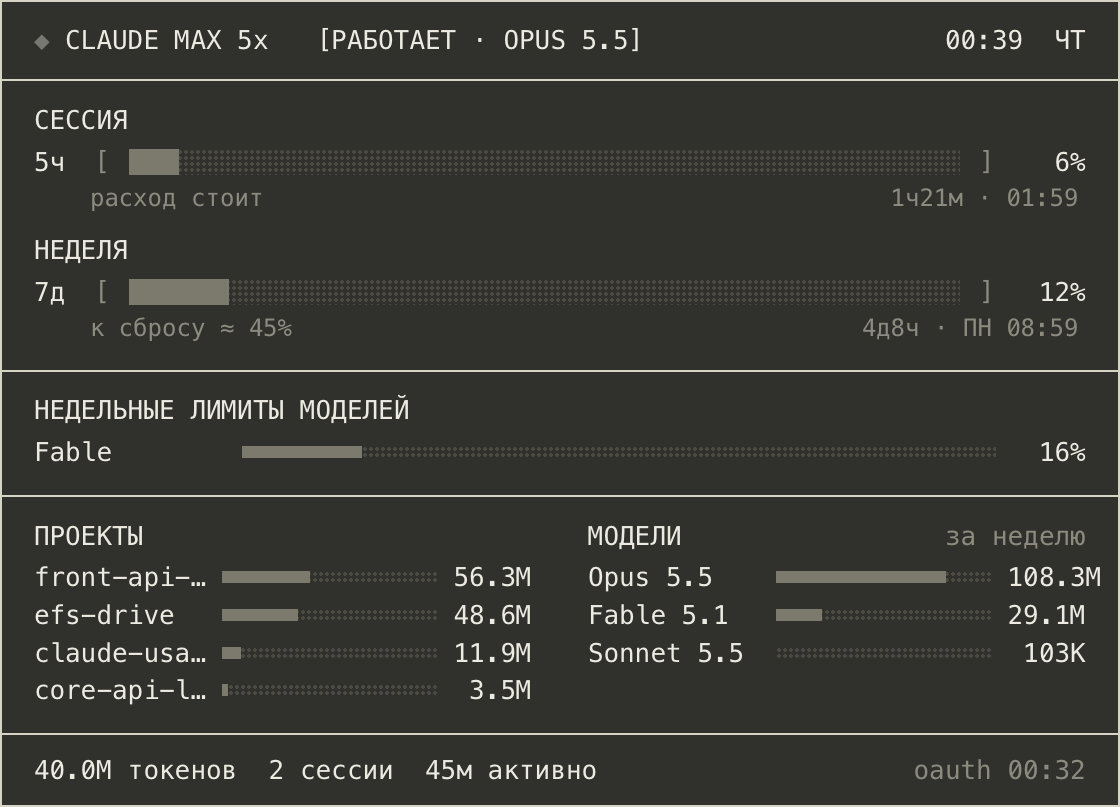
"lang": "en" for English.What it shows
Everything updates on its own every 30 seconds.
Session and weekly limits
Percent used of the 5-hour session and the 7-day limit, with a countdown and the exact reset time.
Exhaustion forecast
From your recent pace: either the expected percent at reset, or the time you will hit the limit and how long before the reset that is.
Per-model weekly limits
Separate weekly limits for individual models, as Claude reports them.
Projects and models
Top projects and models by tokens over the session or the week, read from local Claude Code logs.
Plan and active model
The header shows your plan, such as Max 5x, whether Claude Code is working right now and with which model.
Local and quiet
One small request to Anthropic for per-model limits. Everything else is read from your Mac. No accounts, no telemetry.
Requirements
- macOS 12 Monterey or later.
- Übersicht, a free app that runs desktop widgets.
- Node.js 18 or later.
- Claude Code signed in with a Claude Pro or Max subscription. API accounts have no plan limits to show.
Install
About five minutes. The commands use Homebrew; regular installers work too.
-
Install Übersicht
With Homebrew:
brew install --cask ubersichtOr download it from tracesof.net/uebersicht and move it to Applications. Open Übersicht: its icon appears in the menu bar. In its Preferences, turn on launching at login so the widget is always there.
-
Install Node.js
The widget’s data collector runs on Node.js. With Homebrew:
brew install nodeOr use the installer from nodejs.org. Node from Homebrew, the official installer, Volta, nvm and fnm is found automatically.
-
Add the widget
Download the archive above and unzip it. Click the Übersicht icon in the menu bar, choose Open Widgets Folder and move the
claude-usage.widgetfolder there. Keep the folder name as it is.The widget appears in the bottom left corner within half a minute. It starts in Russian: open
claude-usage.widget/config.jsonand set"lang": "en". -
Connect the Claude Code status line
Plan usage is sent only to the Claude Code status line, so the widget takes it from there. Add this to
~/.claude/settings.json:{ "statusLine": { "type": "command", "command": "node \"$HOME/Library/Application Support/Übersicht/widgets/claude-usage.widget/lib/statusline.cjs\"" } }Restart Claude Code and send any message. The status line shows a short summary like
◆ Opus 5.5 5h 47% 7d 30%. Already have your own status line? Keep it: append--then "your-command"to the command, and the hook passes the same input to it and prints its output instead. -
Allow Keychain access, if asked
Per-model limits come from Anthropic using the token Claude Code keeps in your Keychain. Usually macOS does not ask anything. If it shows a dialog for
security, allow it, or turn this off with"oauth": { "enabled": false }in the config.
Updating: download the new archive and replace the claude-usage.widget folder. Copy your config.json aside first and put it back afterwards.
Settings
Edit config.json inside the widget folder. The widget picks changes up on its next refresh, and invalid values fall back to defaults.
| Key | What it does |
|---|---|
lang | Interface language: "ru" or "en". |
ui.position | Where the widget sits, in points from the screen edges, e.g. { "top": 40, "right": 40 }. |
ui.scale | Size multiplier, from 0.5 to 3. |
breakdown.window | Period for projects and models: "session" or "week". |
oauth.enabled | Set to false to never contact Anthropic or the Keychain. Per-model limits disappear. |
Where the data comes from
The status line is the only official source of plan usage, but it updates only while Claude Code runs. Limits are shared with claude.ai, so the widget falls back to Anthropic when the status line goes quiet.
| What | Source |
|---|---|
| Session and weekly percent, reset times | Claude Code status line, on every update |
| The same when the status line is silent for 15 minutes; per-model limits | api.anthropic.com/api/oauth/usage, at most every 5 minutes |
| Tokens, sessions, active time, projects, models, active model | Claude Code logs in ~/.claude/projects |
| Your plan | ~/.claude.json, maintained by Claude Code |
Privacy. The only network request goes to api.anthropic.com. The token is read from the Keychain on demand and is never saved, logged or refreshed. The cache in ~/.cache/claude-usage-widget holds only percentages, reset times and log summaries, and is safe to delete. The endpoint is unofficial: if it changes, only per-model limits and the fallback stop working.
If something is off
No limits, only a note about the status line
The status line has not sent anything yet. Check the command in ~/.claude/settings.json, then start Claude Code and send a message.
The widget does not change
It refreshes every 30 seconds. To force it, choose Refresh All Widgets in the Übersicht menu.
Node.js not found
Install Node.js as in step 2. If it lives somewhere unusual, add its path to run.sh in the widget folder.